Summary
Objective: Extract a report of employees who applied leave on a specific date
Module: Leaves > Requests
Method: Apply filters + export report
Outcome: Downloadable report based on selected criteria
Purpose
Determine employees who have applied leave on a specific date
Support bulk operations such as entitlement adjustments, including:
Public Holiday replacement (e.g., ad-hoc holiday announcement)
Policy changes impacting leave balances
Correction of wrongly deducted leave
System or configuration-related adjustments
May refer to: How to Bulk Adjust Employee's Leave Entitlement?
Guidance / Next Steps
Navigate to Leave Requests
Go to Leaves module
Select Requests
Open Filter Panel
Click on the Filter icon
Set Date Criteria
Under Date, select the required date
Set Date Type to Exact Taken Date (recommended for precise filtering)
(Optional) Apply Additional Filters
Leave Policy
Organisation / Structure
Location
Status
Apply Filter
Click Filter Requests
Download Report
Click Download Report to export the filtered results
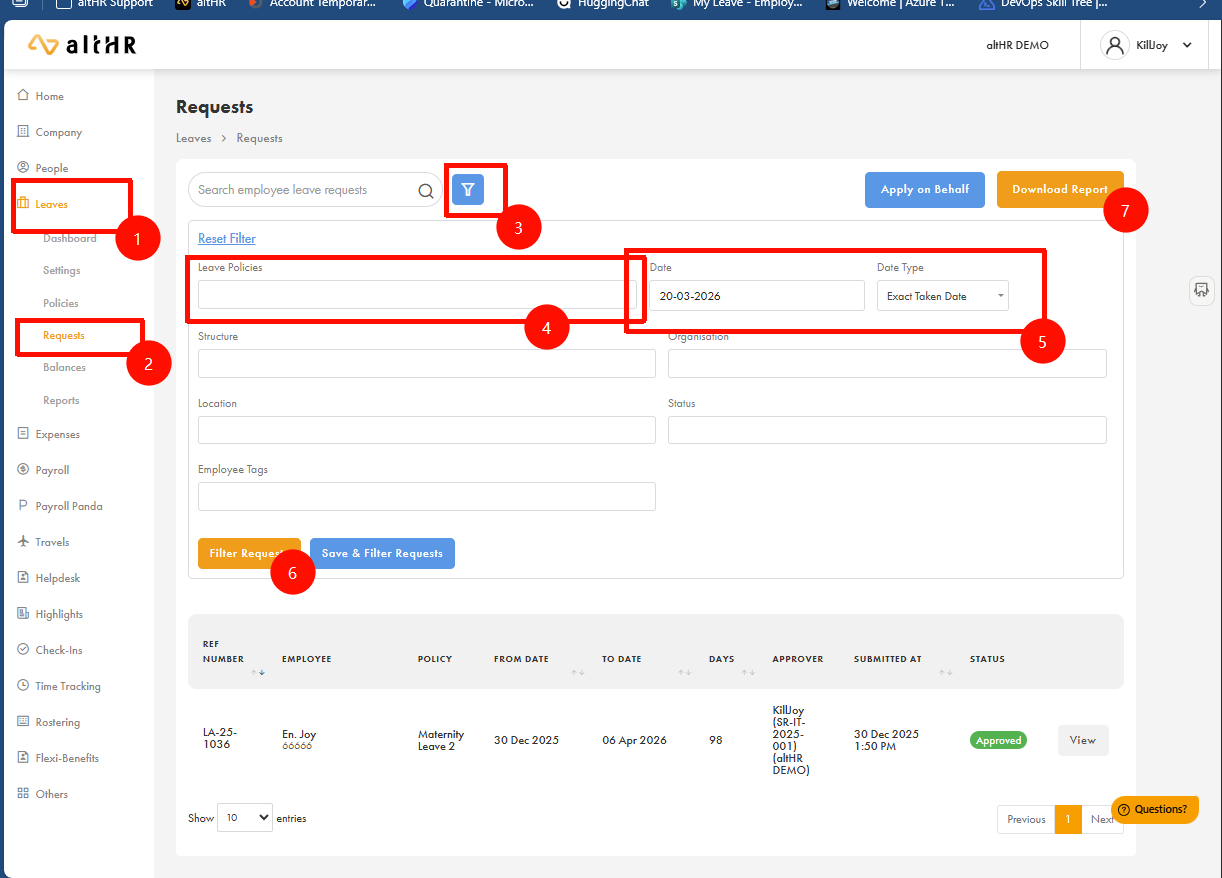
? This will generate a report containing all employees who have leave records matching the selected date criteria.
Was this article helpful?
That’s Great!
Thank you for your feedback
Sorry! We couldn't be helpful
Thank you for your feedback
Feedback sent
We appreciate your effort and will try to fix the article